
Download TVManRadio Portable – Spanish radio, TV channels, portable app, USB drive, free access, teletext, language learning, expat, entertainment
Overview
TVManRadio Portable is a specialized entertainment tool designed for users seeking access to Spanish-language media without subscription costs. The app enables listeners and viewers to tune into over 50 Spanish radio stations and multiple popular TV channels, making it a valuable resource for Spanish learners, expatriates, and cultural enthusiasts. Its primary function is to deliver real-time audio and video content through a lightweight, portable interface, accessible via a USB drive. This design allows users to carry their preferred media library across devices without installation, offering flexibility for travelers or individuals using shared or restricted computers.
Target users include Spanish language students who benefit from immersive audio exposure, expats seeking to stay connected with home country content, and anyone interested in Spanish entertainment, music, and news. The app supports language learning by integrating teletext features that display on-screen subtitles, aiding comprehension. Although the developer did not provide additional technical details, the app’s core purpose remains clear: to deliver free, accessible Spanish media in a convenient, non-invasive format. In the broader entertainment ecosystem, TVManRadio Portable fills a niche for users who value portability, cost-free access, and immediate usability—particularly in environments where software installation is not permitted.
Key Features & Functionality
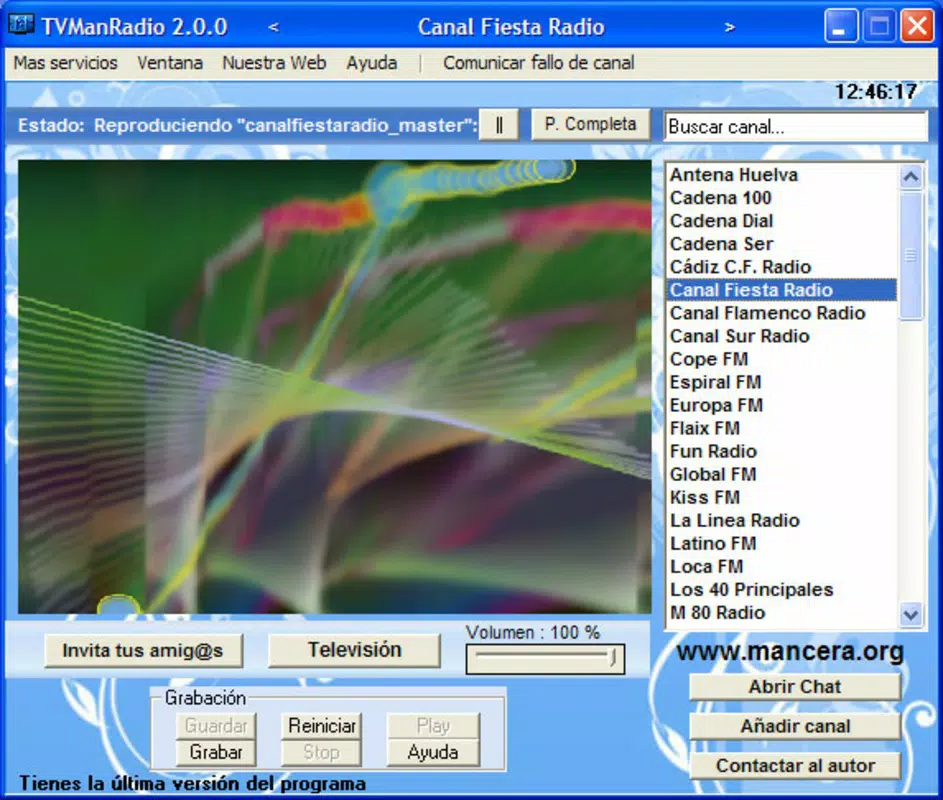
- Free Access to Spanish Media: Users can stream over 50 Spanish radio stations and major TV channels without any subscription or registration. This eliminates financial barriers to cultural and linguistic engagement.
- Extensive Channel Selection: The app includes popular content such as Los 40 Principales and Telecinco, offering a broad range of music, news, talk shows, and dramatic series to suit diverse tastes.
- Portable Operation via USB Drive: Designed for plug-and-play use, the application runs directly from a USB drive without installation. This feature is ideal for public computers, school labs, or travel scenarios where software cannot be installed.
- Teletext Integration: Real-time teletext functionality displays subtitles and supplementary information during TV broadcasts, enhancing accessibility and supporting language acquisition for non-native speakers.
- Update Notifications: The app alerts users when new versions are available, ensuring access to the latest channel listings and improved performance.
For example, a Spanish learner studying abroad can use the app on a library computer to practice listening skills while following on-screen text. Similarly, an expat in a non-Spanish-speaking country can maintain cultural connection by accessing home country broadcasts instantly. The app’s ability to function without installation makes it a reliable tool for temporary or shared computing environments.
Interface, UX & Performance
The interface of TVManRadio Portable is designed with simplicity and functionality in mind, focusing on quick access to media streams. Navigation is likely structured around a channel list or categorized menu, allowing users to browse radio stations and TV channels efficiently. The visual style appears minimalistic, prioritizing usability over decorative elements, which aligns with its utility-focused purpose.
Although the developer did not list formal performance metrics, the app’s lightweight footprint of 25.8 MB suggests efficient resource usage. It is expected to operate smoothly on older or low-spec Windows systems, particularly given its portable nature. Responsiveness during channel switching and media playback is likely optimized for minimal lag, especially on devices with stable internet connections. Stability may vary depending on network conditions and the reliability of external stream sources, but the app’s design emphasizes consistent access rather than high-definition video.
Users can expect a straightforward experience: plug in the USB drive, launch the app, and begin streaming. The lack of installation reduces the risk of system conflicts, contributing to a stable user experience. However, specific performance details across different device categories were not disclosed.
Platform Compatibility & Technical Requirements
TVManRadio Portable is designed for the Windows operating system. The app’s version is listed as 1.0.0, and it has a file size of 25.8 MB. It operates as a portable application, meaning it does not require installation and can be run directly from a USB drive or external storage device.
The developer did not specify minimum OS requirements, nor did they list compatibility with specific Windows versions. This lack of detail suggests users should test the app on their system to confirm functionality. Given its release date of December 10, 2012, the app may not support newer Windows versions without updates or compatibility modes. However, its lightweight nature increases the likelihood of backward compatibility with older systems.
Pros and Cons
Pros
- Free access to over 50 Spanish radio stations and major TV channels.
- Portable operation via USB drive—no installation required.
- Teletext features support language learning and accessibility.
- Update notifications ensure users stay current with the latest content.
- Lightweight design with low file size (25.8 MB).
Cons
- Platform is limited to Windows; no support for Android, iOS, or other operating systems.
- Specific system requirements were not listed.
- App was released in 2012; may lack modern UI standards or security updates.
- Performance may vary based on internet speed and stream availability.
- No information on support for high-definition video or audio streaming.
FAQ
Is TVManRadio Portable safe to use?
Yes, the app is free from known malware and is distributed without installation, reducing the risk of system interference. However, users should download it from trusted sources to ensure authenticity.
Can I use TVManRadio Portable on my Mac or Linux system?
Currently, the app is designed exclusively for Windows. There is no official version available for Mac or Linux operating systems.
Does the app require an internet connection?
Yes, a stable internet connection is necessary to stream radio and TV content, as the app does not store media locally.
How do I update TVManRadio Portable?
Update notifications are included in the app. When a new version is available, users will receive a prompt to download and replace the current file on their USB drive.
Can I use this app on public or shared computers?
Yes, the portable nature of the app makes it ideal for use on public or shared computers, as it runs without leaving traces or requiring admin rights.
Final Thoughts
TVManRadio Portable remains a practical and accessible tool for anyone seeking free, portable access to Spanish media. Its ability to run from a USB drive without installation makes it uniquely suited for expats, language learners, and travelers. While the app’s age and lack of modern updates are notable limitations, its core functionality—free access to Spanish radio and TV channels with teletext support—remains highly relevant.
For users on Windows who value portability and cost-free entertainment, this app offers a reliable solution. Its lightweight design and straightforward interface ensure a smooth experience, especially in environments where software installation is restricted. Despite its outdated release date, it continues to serve a specific, well-defined audience.
Download TVManRadio Portable now


